
Convert PDF files to
Upload a PDF and turn visible statement or document rows into CSV, QIF, QBO, QBD, or Xero-ready output.
Select documents to convert
Drag and drop your bank statements here, or browse files from your computer.
See a real statement turned into a bookkeeping-ready CSV.
Normalized dates, merchant descriptions preserved, categories assigned, and references kept for traceability. Download the samples below to see the full output.


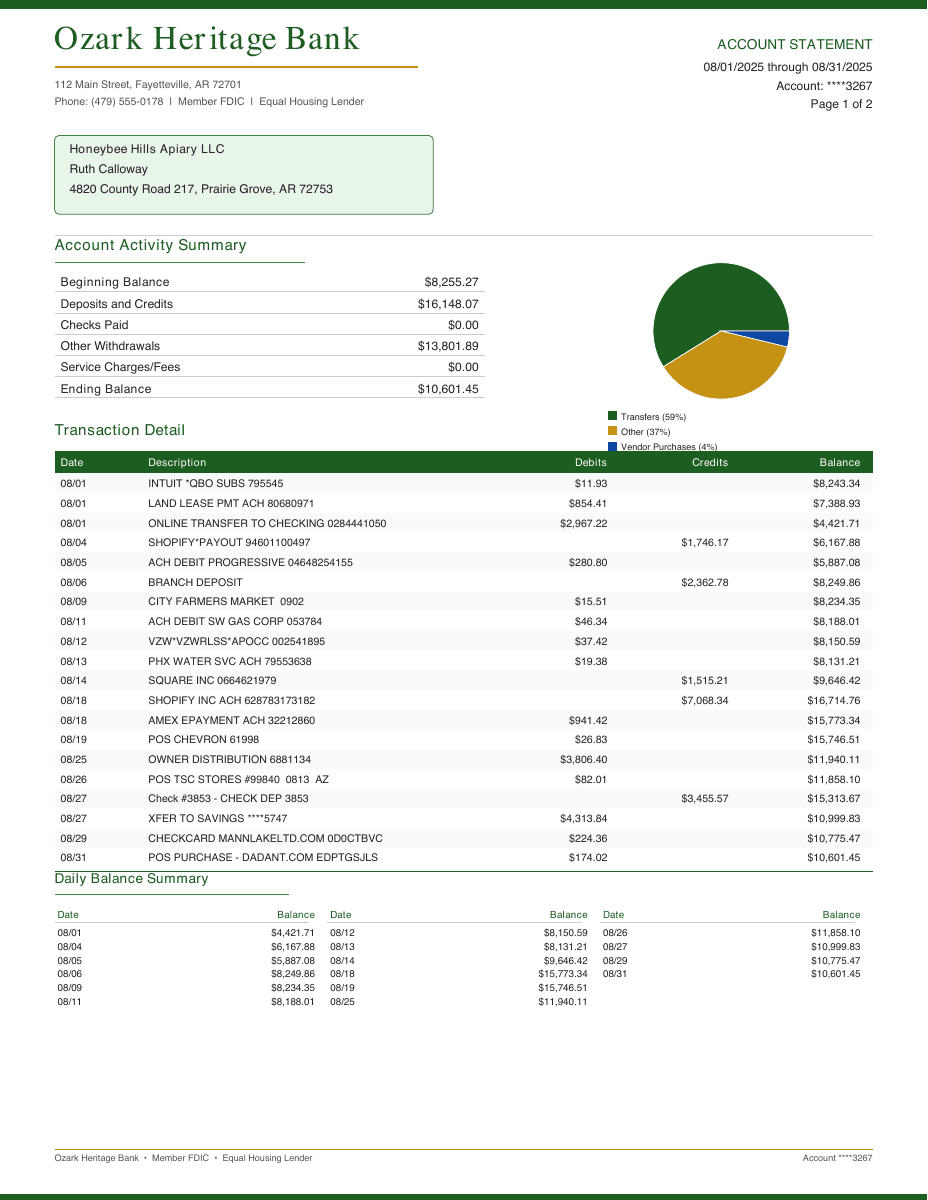
| Date | Description | Amount |
|---|---|---|
| 08/01/2025 | INTUIT *QBO SUBS 795545 Software/Subscription | -$11.93 |
| 08/01/2025 | LAND LEASE PMT ACH 8066971 Rent/Lease | -$854.41 |
| 08/01/2025 | ONLINE TRANSFER TO CHECKING 0284441050 Transfer | -$2,967.42 |
| 08/04/2025 | SHOPIFY*PAYOUT 94601100497 Sales/Income | $1,746.17 |
| 08/05/2025 | ACH DEBIT PROGRESSIVE 04648254155 Insurance | -$280.80 |
| 08/06/2025 | BRANCH DEPOSIT Deposit/Income | $2,362.78 |
Messy docs in. Clean CSV out.
Built for real statements, invoices, and receipts.
Reconcile automatically.
Checks debit and credit movement against opening and closing balances.
Encrypted throughout.
Upload, conversion, and download stay fully encrypted.
Global Adoption
Trusted in 35 countries.
Processing 6,217+ bank statements, card statements, and invoices for businesses worldwide.
35
Countries
6,217
Documents Converted
Pricing
Simple credit packs. 1 credit covers up to 10 pages.
Have questions or need help?
Let us know if you have any questions. The Wesley AI team is here to help.
Convert the PDF before it becomes accounting cleanup
The expensive part of converting PDF to CSV is usually not the file download. It is catching bad rows before they enter the ledger. Wesley keeps the conversion, review, and export steps in one workflow.
Use it for statement PDFs, card statements, invoices, and receipts where a spreadsheet-first review is safer than importing directly.
- Extract visible rows into a structured table.
- Review transaction signs and descriptions before export.
- Download CSV first, or switch to an accounting-specific output format.
Related workflows
Coverage and operator resources
Use these pages when the workflow question is bigger than one file conversion.
Explore next
Open the support pages that sit around this workflow.
Supported banks
See which institutions have dedicated coverage pages and where statement fallback still makes sense.
Open page →
Supported statement types
See which source documents Wesley can clean up before export or import prep.
Open page →
Bank Statement Cleanup SOP for Bookkeepers
A bank statement cleanup SOP for bookkeepers who need a repeatable review process before exporting to QuickBooks, Xero, QIF, or spreadsheet workflows.
Open page →
Frequently asked questions
What kind of PDFs can I convert to CSV?
Wesley is best for accounting documents with visible rows, including bank statements, credit card statements, invoices, and receipts.
Can I export something besides CSV?
Yes. The same upload can be exported as Generic CSV, QBO CSV, QBD CSV, QIF, or Xero-ready CSV depending on the workflow.