Why Bank Feeds Aren't Enough: When You Still Need CSV Imports for QuickBooks and Xero

Bank feeds are great for ongoing bookkeeping. They are not a complete recovery plan.
If you are catching up a file, backfilling missing months, importing an old credit card account, or working from PDFs that a client uploaded after month end, you usually still need a CSV import. The hard part is rarely the upload button inside QuickBooks or Xero. The hard part is turning raw statements and financial documents into a clean file with the right columns, dates, and signed amounts.
That is where a document to CSV converter matters.
Why bank feeds still leave gaps
A live bank feed solves one problem: pulling recent transactions from a connected account.
It does not reliably solve these problems:
- You need older history than the feed initially brought in.
- The feed disconnected and missed a period you now need to repair.
- The bank or card account is not supported, or support is inconsistent.
- A client sent monthly statements as PDFs instead of giving direct access.
- You are cleaning up a legacy file before tax season or after a migration.
This is why accountants and finance teams keep running into the same question: if bank feeds exist, why am I still importing CSV files?
The answer is simple. Bank feeds are for ongoing sync. CSV imports are for backfill, repair, cleanup, and control.
Choose your workflow
Best QuickBooks statement import software
Category comparison for teams choosing a QuickBooks statement import tool.
Import bank statements into QuickBooks Online
Use a PDF-first workflow that ends in a QBO-ready CSV for QuickBooks Online.
Bank statement to QBO
Convert statement PDFs into a QBO-ready CSV.
Import bank statements into Xero
Upload PDFs and export a Xero-ready CSV with payee, description, and reference columns.
Bank statement to Xero CSV
Create a Xero-ready statement CSV from a PDF.
Coverage and resources
Open the authority pages that support this workflow.
Supported banks
See which institutions have dedicated coverage pages and where statement fallback still makes sense.
Open page →
Supported statement types
See which source documents Wesley can clean up before export or import prep.
Open page →
Bank Statement Cleanup SOP for Bookkeepers
A bank statement cleanup SOP for bookkeepers who need a repeatable review process before exporting to QuickBooks, Xero, QIF, or spreadsheet workflows.
Open page →
QuickBooks Online Statement Import Prep
Use Wesley before QuickBooks Online when the source file is still a PDF statement, scanned statement, or messy CSV that needs review before import.
Open page →
When CSV import is the better tool than the bank feed
1. You need historical transactions fast
A common example is a brand-new QuickBooks file that only pulled recent activity after the bank connection was set up. If you need six months or twelve months of history, a CSV import is usually the faster path than waiting on feed troubleshooting.
2. Your client sends statements instead of granting access
This happens constantly with cleanup work. The client sends bank statements, credit card statements, invoices, or receipts. You do not have a live integration, but you still need structured rows you can import, review, and reconcile.
3. The feed is broken, delayed, or incomplete
Even good bank feeds fail at the worst time. When transactions are missing and the books cannot wait, importing a CSV becomes the practical fallback.
4. You are moving data into a platform-specific format
QuickBooks Online, QuickBooks Desktop, and Xero do not expect the exact same CSV shape. If your source document is a PDF or scan, someone still has to map it into the right output.
Why the real bottleneck is formatting, not importing
Most teams already know where to upload a CSV.
The real pain is getting the document into an import-ready structure:
- Dates have to be normalized.
- Amount signs need to be correct.
- Descriptions need to preserve enough detail to match and categorize later.
- Extra columns can break imports.
- Multi-page statements and scans often split rows or lose context.
That is why manual copy-paste is such a bad use of bookkeeping time. It is tedious, fragile, and easy to get wrong at the exact point where accuracy matters.
Where a document to CSV converter helps
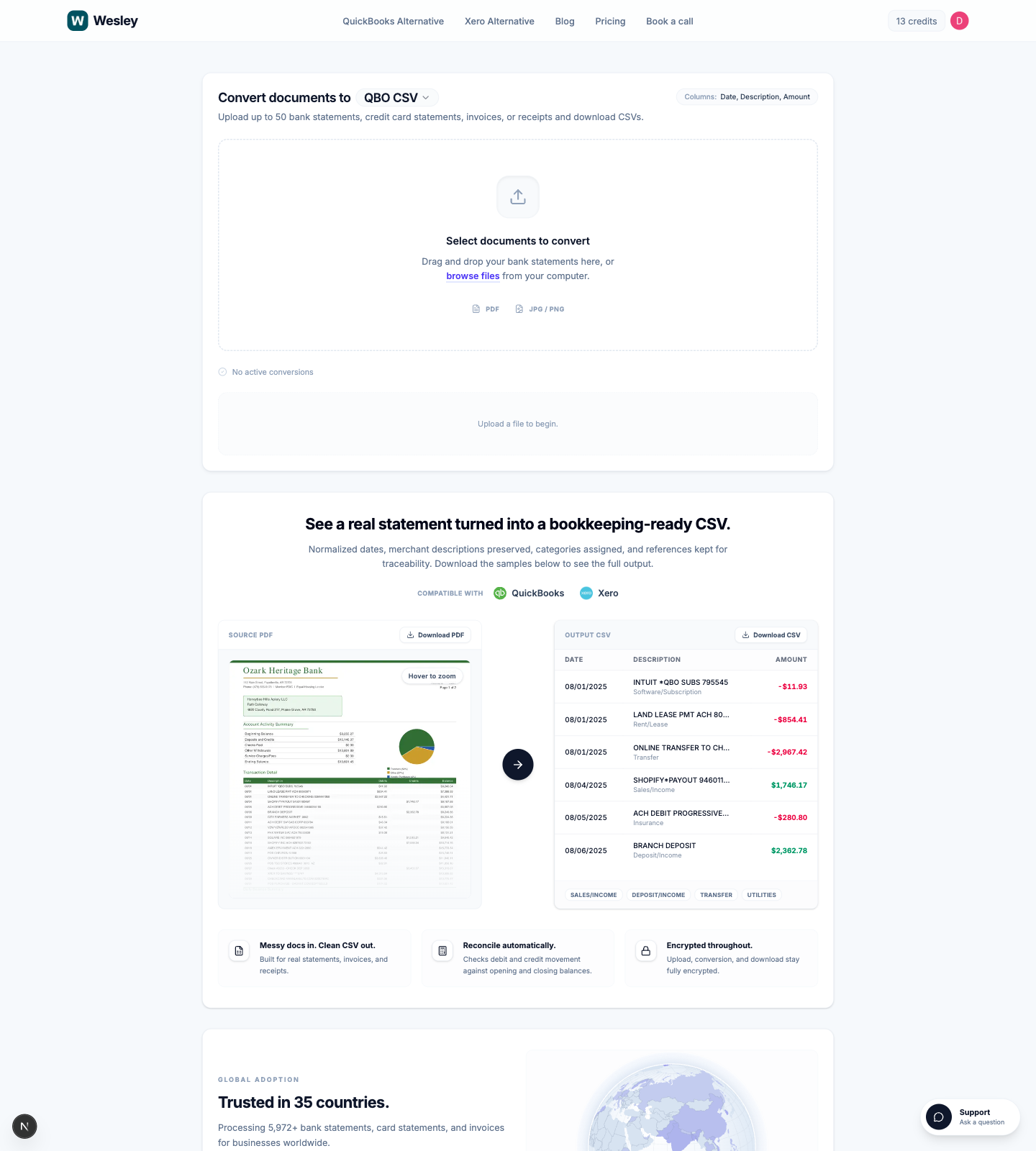 A good document to CSV converter does more than extract text. It should turn raw financial documents into the format you actually need next.
With Wesley's document to CSV converter, you can upload up to 50 documents at once and convert:
- bank statements
- credit card statements
- invoices
- receipts
You can then choose the output that matches the destination workflow:
- QBO CSV for QuickBooks Online imports
- QBD CSV for QuickBooks Desktop cleanup and legacy workflows
- Xero CSV for Xero statement imports
- Generic CSV for spreadsheet review or custom downstream work
That matters because the right converter should save you from doing one more round of cleanup after conversion.
What this looks like in real workflows
Catch-up bookkeeping
You receive eight months of PDFs from a client. Instead of retyping transactions or waiting for a feed fix, you convert the statements into CSV, import them, then move directly into review and reconciliation.
Broken feed recovery
A bank feed disconnects during a close period. You export or collect the missing source documents, convert them into the right CSV format, and restore the gap without rebuilding the entire account history by hand.
Multi-entity or seasonal cleanup
During tax season, the speed advantage matters. When you are handling multiple entities, every hour spent reformatting bank statements is an hour not spent reviewing exceptions.
What to look for in a CSV converter for QuickBooks or Xero
If your goal is platform-ready imports, the converter should handle more than OCR.
Look for these capabilities:
- Output formats that match QuickBooks Online, QuickBooks Desktop, Xero, or a generic CSV.
- Correct signed amounts for money in and money out.
- Reliable handling for scanned statements and inconsistent PDFs.
- Batch processing so you are not converting one file at a time.
- Clean descriptions and references that remain useful after import.
If the tool only gives you a rough table dump, you still have a formatting project. That is exactly what you are trying to avoid.
FAQ
Why do I need CSV import if I already have bank feeds?
Because bank feeds are not designed to solve every historical or recovery scenario. They are excellent for ongoing sync, but CSV imports are still the fastest way to backfill missing periods, repair broken feeds, and work from client-provided documents.
Can QuickBooks import older transactions with CSV?
Yes. When the initial bank connection does not bring in enough history, CSV upload is the practical fallback. QuickBooks guidance commonly points users to manual CSV upload when they need more than the recent history that first came through the feed. See the QuickBooks discussion here: How do I upload past transactions from my bank account?
Can Xero import bank statements with CSV?
Yes. Xero supports statement imports in CSV and other bank file formats, which is useful when a direct feed is unavailable or unsupported. Xero's banking overview is here: Connect Bank Feeds for Easy Financial Admin
What is the fastest way to turn statements into import-ready CSV?
Use a converter that understands financial documents and can output a platform-ready CSV directly. That removes the slowest part of the job: manual table cleanup.
Final takeaway
Bank feeds are not the enemy. They are just incomplete.
If you work in QuickBooks or Xero, you still need a fast path for historical imports, broken connections, client-sent PDFs, and cleanup projects. That is why CSV imports still matter, and why a purpose-built document to CSV converter saves so much time compared with manual reformatting.
If that is the bottleneck in your workflow, try Wesley's document to CSV converter and skip the spreadsheet cleanup step.
Ready to use the matching workflow?
Import bank statements into QuickBooks Online
Use a PDF-first workflow that ends in a QBO-ready CSV for QuickBooks Online.
Related reads
Discover adjacent articles without being sent to near-duplicate topics.

